GitHub organization compromised? Incident response guide
What to do when your GitHub organization is compromised: preserve the audit log, contain tokens and workflows, scope with Git events, then pivot to the cloud.
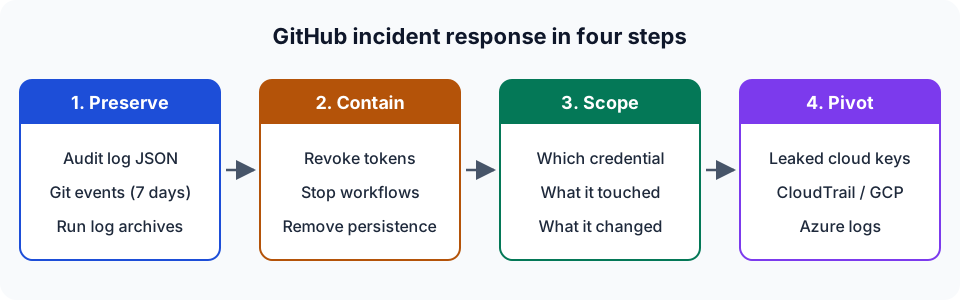
TL;DR. A compromised GitHub organization is usually a supply-chain incident in its early stage. Someone holds a token, a key or an owner session, and your source code, your CI/CD and your cloud credentials are all within reach. Work in this order: preserve the audit log and Git events (Git events are kept 7 days), contain (revoke credentials, stop workflows, remove persistence), scope with the evidence, then pivot to the cloud accounts whose keys lived in Actions secrets. You can check the exports with the free in-browser analyzer, which uploads nothing.
GitHub is often an attacker's first foothold in the cloud. One stolen personal access token opens the private repositories, the workflows that deploy to production and the secrets those workflows hold. This guide is the entry point of the series. Each section summarises one scenario and links to the playbook that covers it in depth.
How GitHub organizations get compromised
Almost every incident I see starts with one of these:
| Entry point | Typical evidence in the audit log | Playbook |
|---|---|---|
| Personal access token stolen by an infostealer or leaked in code | same hashed_token from a new country / IP, git.clone bursts | Leaked GitHub token |
| OAuth app or GitHub App token stolen from a third party | API activity by an integration, repositories listed and downloaded | Leaked GitHub token |
| Poisoned workflow or compromised third-party action | workflows.created_workflow_run on a new branch, encoded blobs in run logs | Actions secrets leak |
| Rogue or compromised self-hosted runner | org.register_self_hosted_runner, jobs on unknown runners | Self-hosted runner security |
| Owner account takeover | org.update_member to admin, org.disable_two_factor_requirement | Organization takeover |
This is not only theory. In April 2022 GitHub reported that an attacker had used stolen OAuth user tokens issued to Heroku and Travis CI to list and download private repositories from dozens of organizations. In March 2025, CISA published an alert about the tj-actions/changed-files compromise (CVE-2025-30066): a popular action was modified so that it printed CI secrets into workflow logs. In September 2025, CISA's npm ecosystem alert described malware that harvested GitHub PATs and cloud keys from developer environments.
Step 1: preserve the evidence first
Retention sets the order of work. GitHub keeps organization audit events for 180 days, but Git events for only seven days. By default, Actions logs are kept for 90 days, and anyone with write access to the repository can delete a run's logs. An attacker who has your token can therefore erase the most useful evidence.
Before you touch anything:
- Export the organization audit log as JSON for the whole suspected window, plus a few weeks of baseline before it.
- On GitHub Enterprise Cloud, pull the Git events (
git.clone,git.fetch,git.push) through the REST API withinclude=all, or use the enterprise "Export Git Events" menu. - Download the log archive of every suspicious workflow run.
- If you stream the audit log to S3, Azure Blob or GCS, copy the relevant
YYYY/MM/DD/HH/MM/folders. - Store the copies read-only and hash them.
The export guide goes through each source step by step and lists the plan each one needs.
Step 2: contain
GitHub's own incident response tutorial recommends that you choose containment actions based on the threat and not apply all of them blindly. The actions that stop most real incidents are these:
- Revoke the credentials involved. If you have the literal token, anyone can revoke it through the credential revocation API. Otherwise, the owner revokes it, or an owner revokes its SSO authorization. Check the developer's machine for an infostealer before issuing a new token.
- Stop the pipeline. Cancel running workflows, delete attacker branches, and disable Actions on the affected repositories if necessary.
- Remove persistence. Look for deploy keys, SSH keys, webhooks, GitHub Apps, OAuth app approvals, outside collaborators and self-hosted runners added during the incident window.
- Rotate every secret the affected workflows could read, not only the ones you saw printed.
Step 3: scope with the audit log
Scoping answers three questions: which credential, what did it touch, what did it change.
Which credential
Token-authenticated events carry hashed_token, programmatic_access_type and token_scopes. GitHub documents how to identify audit log events performed by an access token. Group by hashed_token rather than by actor. A stolen token belongs to a legitimate user, so its activity is mixed with theirs, but the attacker's IPs and countries differ.
What it touched
The Git events tell you which repositories were cloned and when. Ten or more distinct repositories cloned from one IP within an hour is not normal developer behaviour. See detecting repository exfiltration for the other exfiltration routes: repo.download_zip, visibility changes and transfers.
What it changed
Filter on the actions that weaken a control or add access. This table gives the minimum set:
| Area | Actions to review |
|---|---|
| Owners and admins | org.update_member / org.add_member with permission: admin, business.add_admin |
| Authentication | org.disable_two_factor_requirement, org.disable_saml, org.update_saml_provider_settings |
| Network | ip_allow_list.disable, ip_allow_list.disable_for_installed_apps |
| Logging | audit_log_streaming.destroy, audit_log_streaming.update |
| Code integrity | protected_branch.destroy, repository_ruleset.destroy, protected_branch.policy_override |
| CI/CD | environment.remove_protection_rule, org.register_self_hosted_runner, *.create_actions_secret |
| Persistence | public_key.create, hook.create, integration_installation.create |
The branch protection article and the takeover article explain how to read each of these.
Step 4: follow the secrets into the cloud
Actions secrets are mostly cloud credentials. When they leak, the incident has only begun. The next evidence lives in CloudTrail, in Google Cloud audit logs or in Azure activity logs. The cloud pivot article covers that step and links to the sibling tools for AWS, Google Cloud and Azure.
How the analyzer on this site fits in
The GitHub Forensics tool reads the exports described above: the UI JSON / CSV, REST API pages, streaming .json.log.gz files, the Git events export, Actions log ZIPs and secret-scanning alerts. It evaluates 31 published detection rules and returns a verdict (Clean, Suspicious or Compromised), findings with their evidence and ATT&CK techniques, a timeline and a remediation checklist. Everything runs locally in WebAssembly.
The rules are heuristics with thresholds, and a Clean verdict only covers what the export contains. The limitations article lists what the audit log never records. If you want to see what a finished analysis looks like first, the fictional northwind-labs walkthrough goes through the sample incident finding by finding.
FAQ
What is the first thing to do when a GitHub organization is compromised?
Export the evidence before you change anything: the organization audit log (JSON) and, on Enterprise Cloud, the Git events, which are kept for only seven days. Download the log archives of suspicious workflow runs. Then revoke the tokens involved and stop malicious workflows.
Does GitHub record which repositories were cloned?
Yes, as git.clone, git.fetch and git.push events. You can only get them through the REST API with include=git or include=all, through audit log streaming or through the enterprise Git events export, and only on GitHub Enterprise Cloud. They are kept for seven days.
Can I investigate a GitHub incident without a SIEM?
Yes. The audit log export, the Git events export and Actions log archives are plain JSON, gzip and ZIP files. You can read them with jq, or drop them in an offline analyzer such as the one on this site, which runs entirely in the browser.
Further reading
- GitHub Docs: Common security incident investigation areas
- OWASP: Top 10 CI/CD Security Risks
- MITRE ATT&CK: T1213.003 Code Repositories, T1677 Poisoned Pipeline Execution
- Glossary: GitHub audit log, personal access token, audit log streaming